
The PSA Tell: What Your MSP's Tooling Says About Your Growth Ceiling
Originally published

Listen to this article
Browser text-to-speech
Methodology note: Fox & Crow Instinct analyzed publicly observable signals from 13,627 U.S. MSPs in 2026. Staff bands are used as a revenue proxy: 1–10 staff ≈ sub-$1M; 11+ staff ≈ above $1M.
Table of Contents
- What Your PSA Configuration Tells Us
- The CRM Gap That Most MSPs Can't See
- MSP PSA Software and the Integration Question
- When Systems Signal You're Not Ready to Hire
- What Growth-Ready Systems Look Like in Practice
- What the Data Tells Us
- FAQ
Your PSA isn't just a ticketing system.
The way you run it — what you track, what you automate, what you leave on tribal knowledge — is a public signal about the operational maturity of your MSP. It tells prospects, vendors, and potential hires something about how your business works before they ever sit down with you.
Most MSP founders don't think about their PSA that way. They think about it as an internal tool. But internal tools produce external signals. And those signals are readable by anyone paying attention.
This post is about what those signals are, what they mean for your MSP's growth ceiling, and what growth-ready operational infrastructure actually looks like from the outside.
What Your PSA Configuration Tells Us
You can tell a lot about an MSP's revenue trajectory by looking at what systems they use and how those systems are connected.
Not because the software causes growth. Because operationally mature MSPs — the ones that have already figured out how to scale past founder-dependent delivery — tend to show up with mature tooling. The correlation runs in that direction. The system reflects how the business is run.
Here's what we see in well-configured PSA environments:
Tickets are categorized consistently. Not just open and closed, but tagged by type, by client, by resolution path. That categorization is what makes billing audits fast, QBRs meaningful, and staffing decisions data-driven rather than gut-driven.
SLA tracking is automated, not manual. If your team has to remember to flag a ticket that's been open too long, your SLA compliance is as good as whoever is most conscientious on any given shift. That's not scalable. Automated escalations and SLA dashboards aren't features — they're maturity signals.
Billing reconciliation is clean. If your month-end close requires a technician to manually count hours against contracts, you have a leaky billing process. Every MSP I've seen scale past $2M has moved to some form of automated billing reconciliation well before they needed it.
Client documentation is searchable and current. If onboarding a new technician for an existing client requires two days of shadow-work because the documentation is in someone's head, you have a bus risk that your PSA could solve. Growth-stage MSPs can't afford bus risk.
"The PSA tells me more about an MSP's operating model in ten minutes than a conversation about their services does in an hour. If the tickets are a mess and the billing is manual, I know where the ceiling is — and it has nothing to do with what they sell."
 Quote: Ian Richardson on MSP PSA and CRM growth signals
The CRM Gap That Most MSPs Can't See
Here's a gap that shows up in almost every sub-$1M MSP I work with: they're using their PSA as a CRM.
The PSA is a service delivery tool. It tracks tickets, assets, contracts, and client documentation. It is not built for pipeline management, activity logging, opportunity tracking, or sales forecasting.
When an MSP uses their PSA as their CRM, what happens to the sales pipeline? It lives in a spreadsheet. Or in the founder's head. Or in an email thread. Nowhere that produces a forecast. Nowhere that survives a sales hire.
The CRM gap doesn't feel like a problem until your MSP tries to add a salesperson, or tries to figure out which outbound activities are producing conversations, or tries to tell an investor what the pipeline looks like.
At that point, "we track leads in a spreadsheet" becomes a credibility problem — with potential hires, with potential acquirers, and with yourself when you're trying to make decisions about where to spend time and money.
A separate CRM — even a basic one — forces you to define your sales stages, track conversion rates by source, and maintain a record of every prospect conversation your MSP has ever had. That's not overhead. That's the infrastructure a salesperson needs to succeed and the data you need to make a hiring decision.
 Social graphic about the gap between PSA and CRM functions
MSP PSA Software and the Integration Question
The question I get most often about MSP PSA software is which one is best.
The honest answer is that for most MSPs, the specific platform matters far less than how deeply it's configured and how consistently the team uses it.
A deeply configured ConnectWise with clean billing, automated SLA tracking, and real client documentation is worth more than a lightly deployed Halo or HaloPSA with open-ended ticket categories and billing that relies on manual review.
The integration question is more useful: what does your PSA connect to, and do those connections run automatically?
MSPs that have PSA-to-RMM integration running automated ticket creation for monitoring alerts aren't doing it because it's cool technology. They're doing it because a human manually creating a ticket from a monitoring alert is a latency and error risk they can't afford at scale.
PSA-to-billing integration eliminates the reconciliation step entirely. PSA-to-documentation integration means new technicians can self-serve client context instead of pulling a senior engineer off another ticket.
Each of those integrations represents a decision to run the business in a way that doesn't depend on any one person being available. That's the operational signal that matters, not which logo is on the login screen.
 Social graphic about PSA integrations that support MSP operations
When Systems Signal You're Not Ready to Hire
The most expensive mistake in MSP growth isn't a bad sales hire. It's a premature sales hire in an environment where the operational foundation can't support the activity the salesperson generates.
Here's what I mean: a salesperson closes two new clients per month. Each of those clients needs an onboarding call, a network documentation session, an asset inventory, and a baseline security review. If your onboarding process lives in a Google Doc that's been edited 47 times, the new client experience is going to be inconsistent. The tickets will be miscategorized. The billing will have gaps. The QBR scheduled for month three will have no data to present.
The client experience suffers. The sales win becomes a churn risk six months later. And the founder blames the salesperson.
The right order is: systems first, then hire.
Your PSA should be clean enough that a new client can be onboarded by a technician who wasn't involved in the sale. Your billing should be clean enough that the revenue from a new client shows up on the P&L predictably. Your documentation should be clean enough that the client's environment can be managed by anyone on the team, not just whoever ran the sale.
When those things are true, a sales hire can succeed. Before then, it's expensive on-the-job training for a problem that shouldn't require a salesperson to solve.
 Social graphic showing operational systems needed before an MSP sales hire
What Growth-Ready Systems Look Like in Practice
Growth-ready operational systems aren't complex. They're just consistent.
Here's a practical checklist:
- Every client has a documentation record in your PSA that a new technician could work from independently
- Tickets are created automatically from monitoring alerts, not manually by whoever happens to see the alert first
- SLA timers run automatically and escalate without a human checking a queue
- Billing reconciles against contracts without a manual audit step
- You have a separate CRM (not your PSA) with defined pipeline stages and a 90-day conversion history
- Your onboarding checklist is the same for every client, documented in your PSA, and owned by a process rather than a person
- You can pull a monthly report on ticket volume by client, resolution time by category, and billing accuracy without asking a technician to build it
None of these require enterprise software. They require consistency and the willingness to build process before it feels necessary.
The MSPs that look like they're ready to scale — to a buyer, a hire, or a strategic partner — are the ones that built this infrastructure before anyone was watching.
What the Data Tells Us
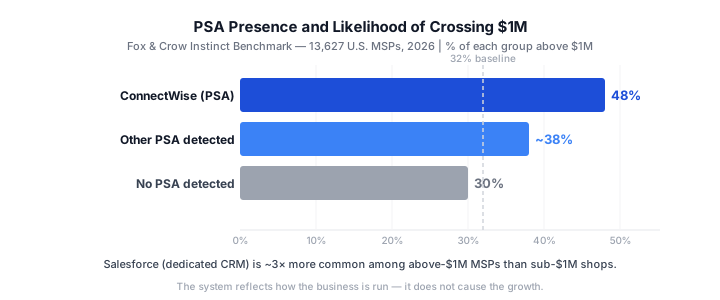 PSA tooling signals by MSP staff band — Fox & Crow Instinct 2026
 MSPs with ConnectWise cross the $1M proxy at 48% compared with 30% when no PSA is detected
The Fox & Crow Instinct benchmark of 13,627 U.S. MSPs reveals an operational signal in tooling. MSPs running ConnectWise are above $1M at a 48% rate. MSPs with no detected PSA are above $1M at a 30% rate. Salesforce — which may signal a dedicated CRM investment separate from service delivery tooling — is roughly three times more common among $1M+ MSPs than sub-$1M shops. Security tooling (RMM, monitoring, backup) varies less by size band and is common across the groups. Operational infrastructure appears to distinguish the bands more than the security stack. None of this proves that installing ConnectWise creates growth. It shows that firms that have crossed the threshold are more likely to have invested in mature operational systems. The systems can be evidence of how the business is run. A full breakdown of tooling signals by MSP size is in the Fox & Crow Instinct MSP growth report.
Want to see where your MSP stands against local competitors?
Fox & Crow Instinct benchmarks MSPs against the signals that showed up in the data: visibility, tenure, tooling, hiring, target-market posture, vertical focus, and regional competition.
FAQ
Does it matter which PSA software my MSP uses for growth?
The specific PSA platform matters less than how it is configured and how consistently the team uses it. A well-configured entry-level PSA outperforms a barely-touched enterprise platform on every operational metric that matters for growth: billing accuracy, SLA compliance, onboarding consistency, and documentation quality. Pick a platform your team will actually use, then invest in configuring it deeply.
Why can't an MSP use its PSA as its CRM?
An MSP's PSA is built to track service delivery — tickets, assets, contracts, client documentation. It isn't built to manage a sales pipeline, track outbound activity, or forecast revenue. When founders use the PSA as a CRM, pipeline data lives in tribal knowledge and can't survive a sales hire or produce the activity reporting needed to make good prospecting decisions. A separate CRM, even a basic one, forces the sales process into a trackable structure.
When should an MSP invest in deeper PSA configuration?
An MSP should consider deeper PSA configuration before operational problems become costly. The right time depends on the complexity of your client base and team, rather than waiting for a billing error or missed ticket to expose a gap. Early operational investment can be less disruptive than making changes under pressure.
What does a PSA signal to a potential acquirer or investor?
A well-configured PSA signals to a potential acquirer or investor that the MSP's revenue is documentable, that service delivery doesn't depend on any single person, and that the business can be understood by someone who wasn't inside it for the last five years. A messy or unused PSA signals the opposite: tribal knowledge, billing risk, and operational dependency on the founder. That gap directly affects valuation in any exit conversation.
How does MSP PSA configuration affect a sales hire's success?
A sales hire needs clean operational infrastructure to succeed. If the onboarding process is inconsistent, new clients close by the salesperson have a bad experience. If billing is manual, revenue from new clients doesn't show up predictably. If there's no CRM, the salesperson has no place to track their pipeline and their manager has no way to coach them. The systems have to be ready for the hire — not the other way around.